
Use Collaboration: navigation and daily work
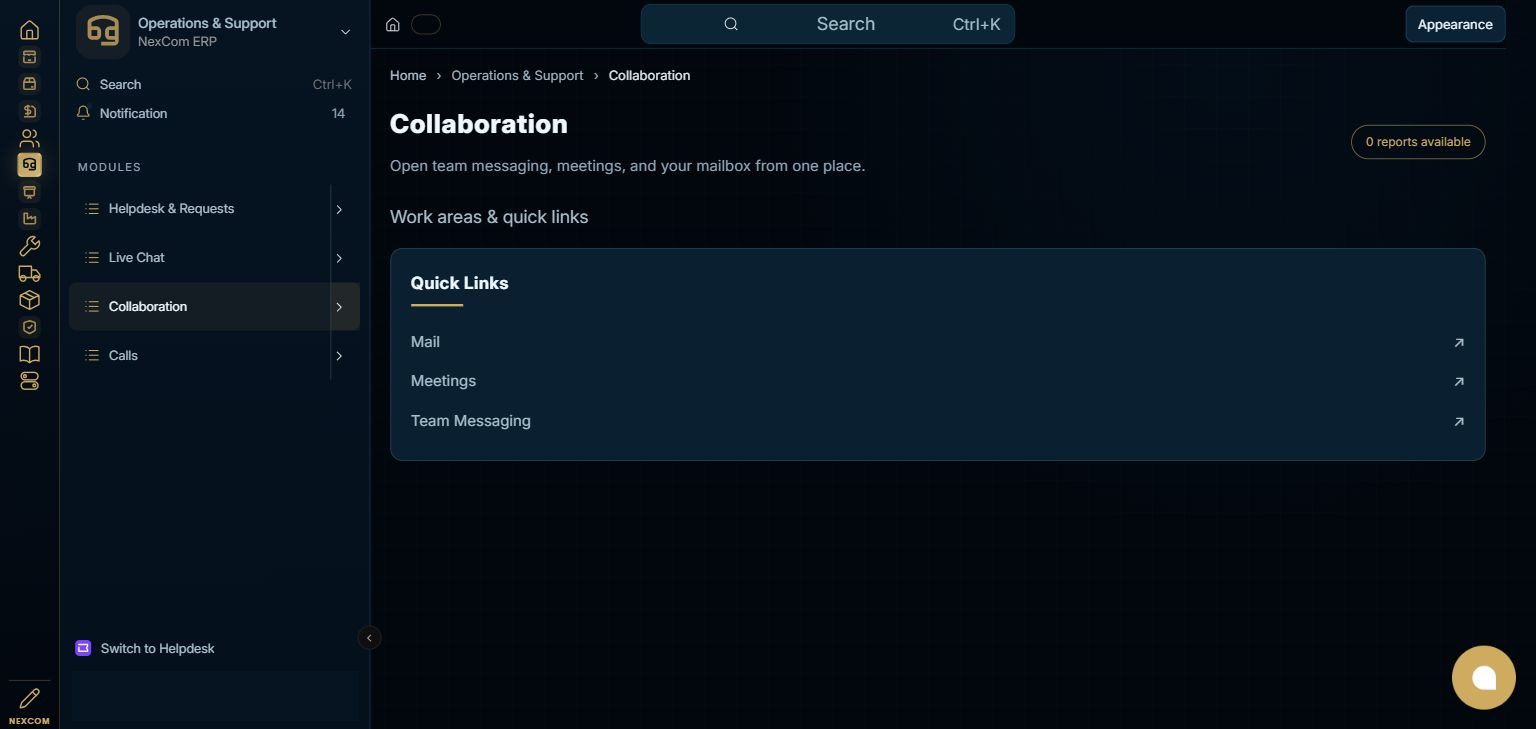
Open Operations & Support using the left app rail, then select Collaboration in its module menu. The module dashboard gathers the available records, reports and setup links.
Before you start
Use team messaging for discussions, meetings for live collaboration, and Mail for individually configured IMAP accounts. An ERP link is an entry point; service sign-in and mailbox authentication may still be required.
Find this module in the ERP
Operations & Support → Collaboration
Step-by-step instructions
Open the module
Open Operations & Support using the left app rail, then select Collaboration in its module menu. The module dashboard gathers the available records, reports and setup links.
{ERP_URL}/desk/nexcom-workflow/Operations%20%26%20Support/CollaborationRecord forms may append /{RECORD_ID}; a new draft may use /new-{TYPE}-{TEMP_ID}. Query filters and selected tabs may add a query string or #fragment.
Continue the task
Choose the work area for your task. This staging dashboard provides the work-area links shown in the screenshot. Use an existing record for a change; use Add/New only when a new record is needed and your role permits it.
{ERP_URL}/desk/nexcom-workflow/Operations%20%26%20Support/CollaborationRecord forms may append /{RECORD_ID}; a new draft may use /new-{TYPE}-{TEMP_ID}. Query filters and selected tabs may add a query string or #fragment.
Continue the task
Before saving or taking a workflow action, verify the relevant party, company, dates, source links and permissions. Use the field reference linked below for the selected record type. This navigation tutorial does not submit a business transaction.
{ERP_URL}/desk/nexcom-workflow/Operations%20%26%20Support/CollaborationRecord forms may append /{RECORD_ID}; a new draft may use /new-{TYPE}-{TEMP_ID}. Query filters and selected tabs may add a query string or #fragment.
Continue the task
Return to the module dashboard to choose the next related work area. If a link is unavailable, check the assigned role and configured service access with your administrator.
{ERP_URL}/desk/nexcom-workflow/Operations%20%26%20Support/CollaborationRecord forms may append /{RECORD_ID}; a new draft may use /new-{TYPE}-{TEMP_ID}. Query filters and selected tabs may add a query string or #fragment.
Choose the relevant work area
Check the result
Check the selected record, company, source relationships, field values and available actions. A successful save, approval, submission, external notification and payment are separate events. The module screenshot is a navigation reference; it is not evidence that the business transaction described in this article was executed.
Troubleshooting
Use the installed work areas and the linked task tutorials below. Available actions and records depend on your role; external services may require their own permitted sign-in.